

- Published on
GitHub Copilot vs Cursor 2026: Still Relevant, Which Is Better?
- Authors

- Name
- Christopher Kvamme
- @MidnightBuild12
GitHub Copilot vs Cursor 2026: Still Relevant, Which Is Better?
TLDR
Copilot Pro is the value pick at 20 per month and climbs fast to 200 for higher usage. Copilot’s Pro+ is $39 per month with premium request limits. Copilot wins on price and integrated workflow. Cursor wins on context window and model flexibility.
Intro
I used Cursor and GitHub Copilot every day for 30 days on real work. I tracked speed, error rate, and how often the tools stalled on multi file changes. This is not a lab benchmark. It is a workflow comparison for working developers who need a tool that saves time.
The Tools at a Glance
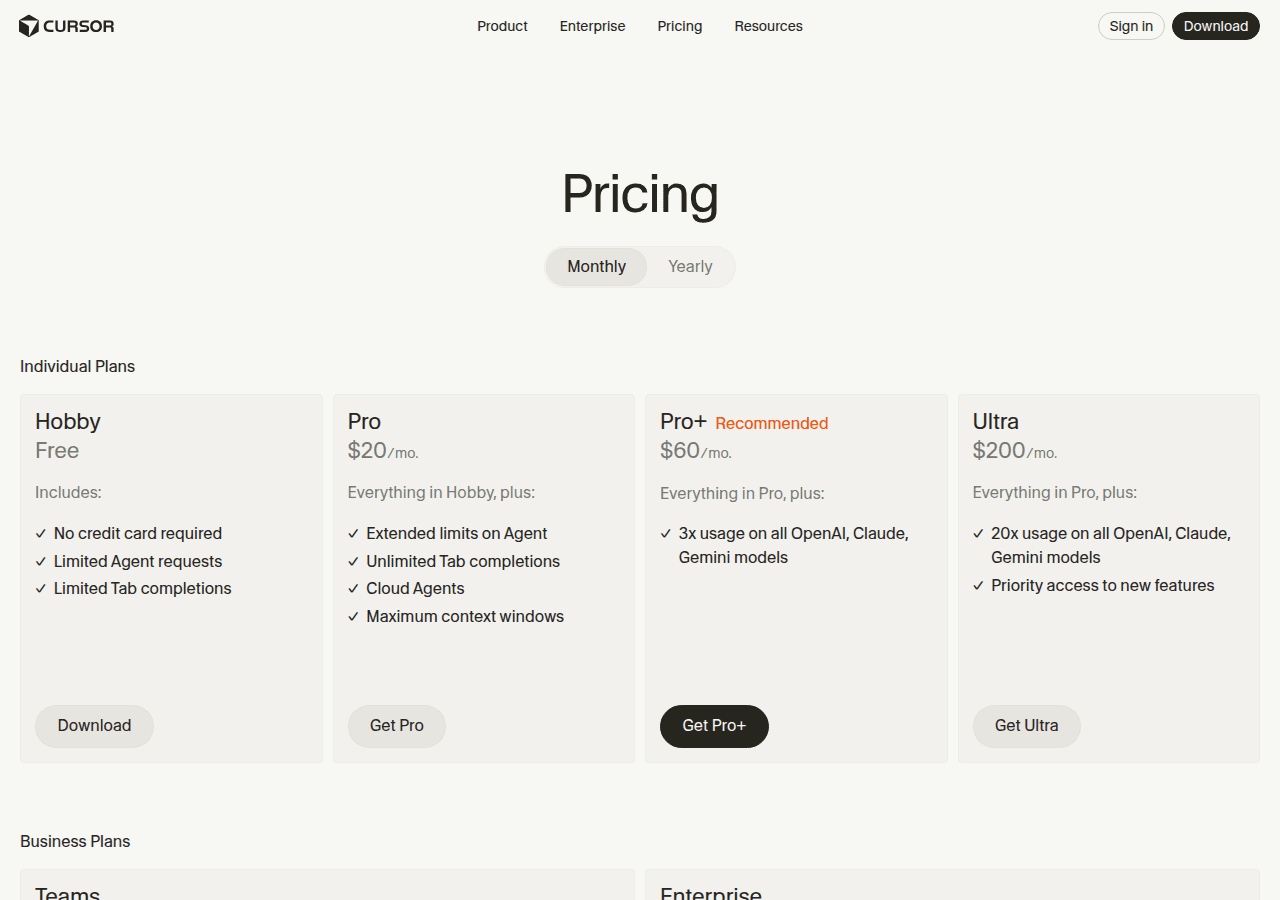
Cursor is a VS Code fork that bundles a multi model AI layer. It sells itself on deep context, strong agent workflows, and access to multiple frontier models. The pricing jump is steep once you move past the free tier. The current pricing page shows Hobby Free, Pro 60 per month, and Ultra 40 per user per month. Source: Cursor pricing.
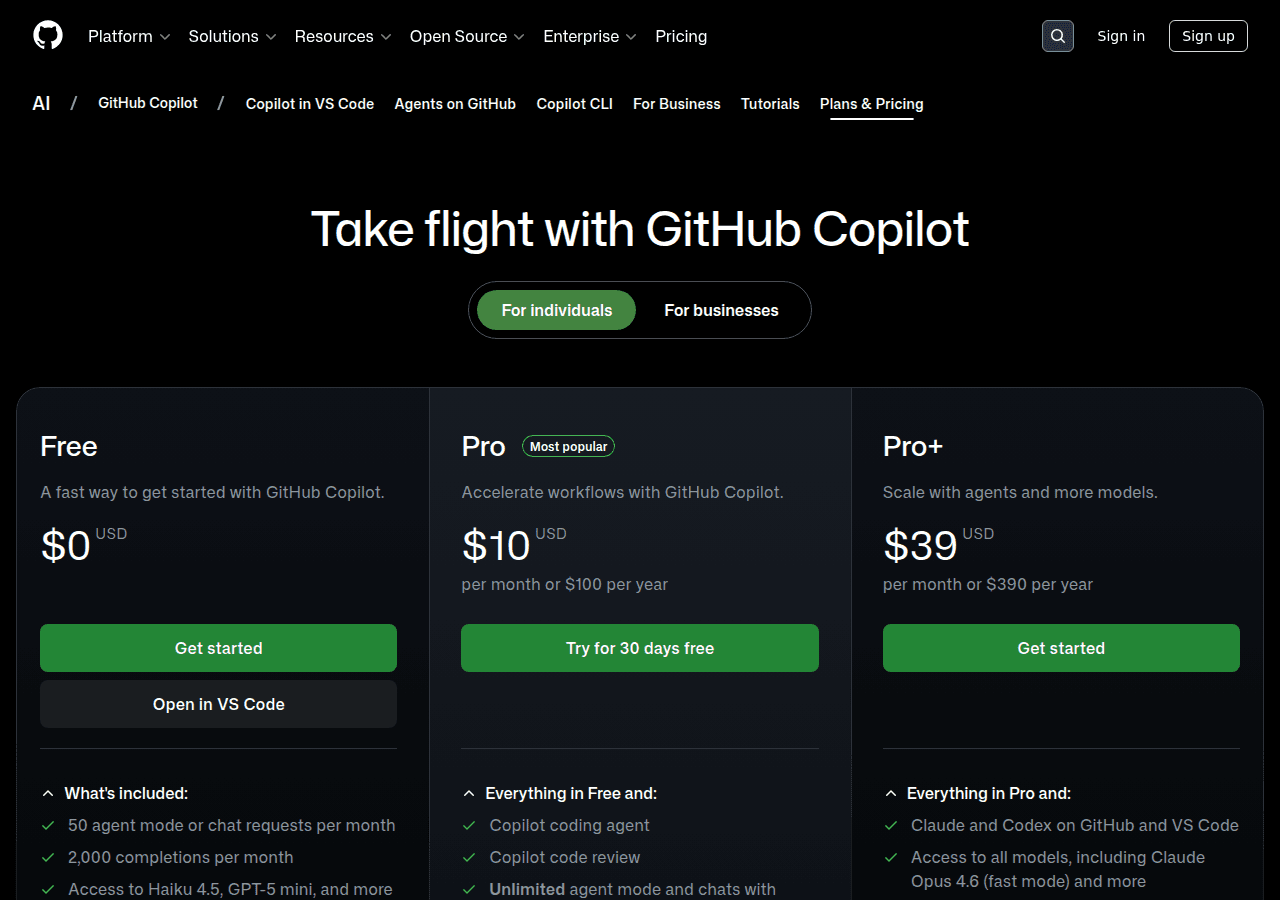
GitHub Copilot is an extension that works across major IDEs. It is tightly integrated into GitHub and has a large user base. Copilot offers Free, Pro at 39 per month. The Pro and Pro+ tiers include premium request limits and unlimited code completions. Copilot also uses premium request limits for chat, agent mode, code review, and the CLI. Source: Copilot plans.
How I Tested
I used both tools for 30 days on real work. That included feature builds, bug fixes, and refactors in an existing codebase. I tracked how often I accepted suggestions, how often I had to fix them, and how often the tools failed on multi file tasks. I also tracked how much context I could feed each tool before results degraded.
I am not claiming a lab benchmark. This is a workflow comparison focused on real outcomes. If you want a quick winner based on numbers alone, skip to the verdict.
Head to Head Criteria
1) Price and Usage Limits
Cursor pricing is aggressive. Pro is 60 per month. Ultra is 40 per user per month. If you are price sensitive, Cursor starts to feel expensive fast.
Copilot is clearly cheaper. Pro is 39 per month. The Free tier exists for light use. Copilot Pro and Pro+ include unlimited code completions and a monthly allowance of premium requests. The plans page lists 50 premium requests for Free, 300 for Pro, and 1,500 for Pro+.
Winner: Copilot on price. It is not close.
2) Models and Context Windows
Cursor lists a long model roster and large context windows. The models page shows 200k context for Claude 3.5 Sonnet and Claude 3.5 Opus, 200k for Gemini 2.5 Pro and Gemini 2.5 Flash, 272k for GPT 5.2 and GPT 5.2 Codex, and 295k for Grok Code. Source: Cursor models.
That is a big advantage if your codebase is large. It is also useful for multi file refactors where smaller contexts fail.
Copilot uses a premium request system for chat and agent features. The plans page lists a wide model roster, including Anthropic Claude Haiku 4.5, Sonnet 4, Sonnet 4.5, Opus 4.1, Opus 4.5, Opus 4.6, Opus 4.6 fast mode (preview), Google Gemini 2.5 Pro, Gemini 3 Pro, Gemini 3 Flash, OpenAI GPT 4.1, GPT 5, and GPT 5 Codex (preview). The billing docs still list included baseline models as GPT 5 mini, GPT 4.1, and GPT 4o. The plans page notes agent mode uses GPT 4.1 and GPT 5 mini. Copilot does not publish context window sizes on the plans page, so you are trusting GitHub to manage context under the hood. Sources: Copilot plans, Copilot billing.
Winner: Cursor on context and model choice.
3) Agent Workflows and Multi File Changes
Cursor positions agent workflows as a core feature. The agent overview page highlights tools, checkpoints, message summarization, queued messages, and export and share. It is built for multi file edits.
Copilot has agent mode and a growing set of agent workflows inside VS Code and GitHub. The plans page shows agent mode access for paid tiers and premium request usage. GitHub also promotes coding agents and PR level code review.
Winner: Tie. Cursor feels more focused on agents inside the editor. Copilot feels more integrated with GitHub and reviews.
4) Reliability and Hallucinations
Both tools will hallucinate if you give them a bad prompt. Cursor’s bigger context windows help reduce missing file errors. Copilot’s tight GitHub integration helps with repo level context when you stay inside its workflow.
Winner: Slight edge to Cursor if your codebase is large. Edge to Copilot if your work is centered around GitHub PRs.
Related: Best AI writing assistants in 2026.
5) Workflow Fit
If you live in VS Code and want an AI focused editor, Cursor makes sense. If you want to keep your IDE, keep your workflow, and add AI without switching tools, Copilot is the safer choice.
Winner: Copilot for most teams. Cursor for solo devs who want the deepest AI integration.
Where Cursor Wins
- Larger context windows and more model variety
- Strong editor native agent workflow
- Better fit for large codebases and complex refactors
Where Copilot Wins
- Price is much lower at Pro and still lower at Pro+
- Works across IDEs without switching editors
- Strong GitHub integration for PRs and code review
The Verdict
If you want the cheapest good AI and you already use GitHub, Copilot Pro is the default pick. If you want max context windows and do deep multi file work daily, Cursor is the better tool, but it costs real money. I would only pay for Cursor Pro+ or Ultra if you are already hitting context limits or you need multiple models for your workflow.
FAQ
Q: Can I use both at the same time? Yes, but it is messy. You end up with overlapping suggestions and two sets of hotkeys. Pick one as your daily driver.
Q: Is Cursor worth the extra cost over Copilot? Only if you need the bigger context windows or specific models. If you are price sensitive, Copilot wins.
Q: Which is better for my language? Copilot supports a huge range of languages across IDEs. Cursor supports the same since it sits on top of VS Code, but model performance still varies by language. Test both if your stack is niche.
Q: Do these tools actually make you faster? Yes, but only if you learn how to prompt and you keep the model on a short leash. Blind trust slows you down.
Q: What about other tools like Claude Code or Cody? They are valid alternatives. This post focuses on Cursor and Copilot because those two are most common in day to day workflows.
Conclusion
If you want the most capability per dollar, Copilot Pro is the best deal. If you want the highest context windows and a multi model editor, Cursor is the power option. Both are good. One is expensive.
For a broader comparison that includes other code assistants like Claude Code and Cline, check out our full AI code assistants review.