
- Published on
cmux: The Terminal Tool Coding Agents Actually Need
- Authors

- Name
- Christopher Kvamme
- @MidnightBuild12
cmux: The Terminal Tool Coding Agents Actually Need
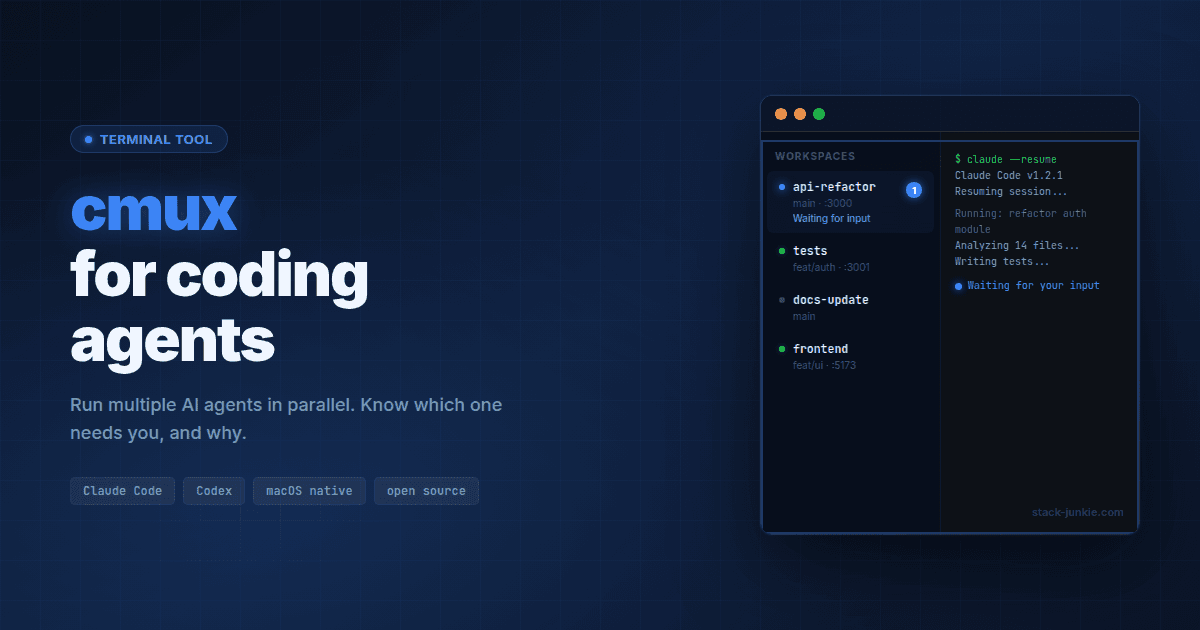
cmux is a native macOS terminal built specifically for running multiple AI coding agents in parallel. It replaces the patchwork of tmux panes and missed desktop notifications with a GUI that shows which agent is waiting, why it's waiting, and lets you jump to it with one keystroke.
Here's what this guide covers:
- What cmux actually does and which agents it supports
- How it differs from tmux in design philosophy
- Step-by-step install and Claude Code hook setup
- The cmux CLI for scripting workspaces
- When cmux is (and isn't) the right choice
Table of Contents
- cmux terminal multiplexer: Managing Multiple Coding Agents at Once
- cmux vs tmux: Agent-Native vs Human-Native Design
- cmux setup: Install and First Workspace in Two Minutes
- cmux with Claude Code: Setting Up Notifications and Hooks
- cmux CLI: Scripting Workspaces and Panes
- cmux limitations: What to Know Before You Switch
- Key Terms
- FAQ
cmux terminal multiplexer: Managing Multiple Coding Agents at Once
cmux is a lightweight, native macOS terminal built on libghostty for managing multiple AI coding agents. It has vertical tabs, a notification panel, and a socket-based control API. Any agent that runs in a terminal works with it out of the box.
The problem it solves is familiar to anyone who runs three or four Claude Code sessions at once. macOS notifications are generic: the body always says "Claude is waiting for your input" with no context about which session or which task. With enough tabs open, terminal titles blur together and you lose track of what needs you.
cmux adds a vertical sidebar showing per-workspace metadata: git branch, linked PR status, working directory, listening ports, and the latest notification text. When an agent needs attention, its pane gets a blue ring and the sidebar tab lights up. Press Cmd+Shift+U to jump directly to the most recent unread workspace, regardless of how many other panes are open.
It supports every terminal-based coding agent: Claude Code, Codex, OpenCode, Gemini CLI, Kiro, Aider, Goose, Amp, Cline, and Cursor Agent. If it runs in a terminal, it runs in cmux.
There's also a built-in browser with a scriptable API ported from Vercel Labs' agent-browser project. Agents can snapshot the accessibility tree, get element references, click, fill forms, and evaluate JavaScript. You can split a browser pane next to a terminal and have Claude Code interact with your local dev server without switching to a separate browser window.
cmux vs tmux: Agent-Native vs Human-Native Design
tmux is a terminal multiplexer that runs inside any terminal, designed for human session management with keyboard-first navigation. cmux is a native GUI app designed from the start for agent workflows: per-pane notifications, a socket API, and no prefix-key gymnastics required.
tmux was built to solve a different problem. It came out of a world where SSH sessions needed to persist through network drops, where developers needed to detach and reattach from remote shells. It does that well. It's been doing it for 15+ years.
Using tmux with coding agents means building on top of a tool that doesn't know agents exist. You write shell scripts to watch terminal titles. You scan all panes manually to see which one stopped. You configure claude to use tmux's split-pane display, which means you need tmux installed and configured correctly. Note that Claude Code's agent-team split-pane mode requires tmux or iTerm2 and does not work with Ghostty-based setups.
cmux treats notifications as a first-class concept. Each workspace tracks unread state. Notifications fire automatically via standard terminal escape sequences (OSC 9/99/777), so any script or tool that emits those sequences gets cmux support for free. There are no prefix keys to remember. The browser is adjacent to the terminal, not a separate app. The socket API at /tmp/cmux.sock accepts control commands from any script.
The trade-off is real: tmux runs on Linux, on remote SSH sessions, inside other terminals. cmux is macOS GUI only, for now. Here's how they compare:
| Feature | tmux | cmux |
|---|---|---|
| Platform | Any (Linux, macOS, remote SSH) | macOS 14+ only |
| Interface | Text-based, runs inside terminal | Native GUI (Swift + AppKit) |
| Agent notifications | None built-in | Per-pane rings, Cmd+Shift+U |
| Built-in browser | No | Yes, scriptable |
| Config | .tmux.conf, prefix keys | Ghostty config + GUI settings |
| Programmatic API | None | CLI + socket at /tmp/cmux.sock |
| License | MIT | AGPL-3.0 |
Neither is universally better. tmux is the right tool for Linux servers and remote workflows. cmux is the right tool for a Mac-based developer running parallel agent sessions locally.
cmux setup: Install and First Workspace in Two Minutes
cmux installs via Homebrew or a DMG download. macOS 14.0 or later is required, on Apple Silicon or Intel.
Homebrew (recommended):
brew tap manaflow-ai/cmux
brew install --cask cmux
To update later: brew upgrade --cask cmux
DMG:
Download from GitHub releases, open the file, and drag cmux to Applications. It auto-updates via Sparkle, so you only need to download once.
On first launch, macOS may ask you to confirm opening an app from an identified developer. Click Open to proceed.
Set up the CLI:
Inside cmux terminals, the cmux command works automatically. To use it from other terminals or scripts, create a symlink:
sudo ln -sf "/Applications/cmux.app/Contents/Resources/bin/cmux" /usr/local/bin/cmux
Then test it:
cmux list-workspaces
Open cmux and you'll see a terminal window with a vertical tab sidebar on the left and one initial workspace ready. Start your agents the same way you normally would: type claude to start Claude Code, or run any other agent command. Each gets its own workspace tab.
cmux with Claude Code: Setting Up Notifications and Hooks
Claude Code's hooks system lets you run shell scripts on specific events. Two hooks cover the most useful cases for cmux: one fires when a session completes, another when a sub-agent finishes a task.
Step 1: Create the hook script
Save this to ~/.claude/hooks/cmux-notify.sh:
#!/bin/bash
# Skip if not running inside cmux
[ -S /tmp/cmux.sock ] || exit 0

EVENT=$(cat)
EVENT_TYPE=$(echo "$EVENT" | jq -r '.event // "unknown"')
TOOL=$(echo "$EVENT" | jq -r '.tool_name // ""')

case "$EVENT_TYPE" in
  "Stop")
    cmux notify --title "Claude Code" --body "Session complete"
    ;;
  "PostToolUse")
    [ "$TOOL" = "Task" ] && cmux notify --title "Claude Code" --body "Agent finished"
    ;;
esac
Make it executable:
chmod +x ~/.claude/hooks/cmux-notify.sh
Step 2: Configure Claude Code
Add to ~/.claude/settings.json:
{
  "hooks": {
    "Stop": ["~/.claude/hooks/cmux-notify.sh"],
    "PostToolUse": [
      {
        "matcher": "Task",
        "hooks": ["~/.claude/hooks/cmux-notify.sh"]
      }
    ]
  }
}
Restart Claude Code to apply the hooks.
When Claude Code finishes a session or a delegated agent completes a task, the workspace tab lights up in the cmux sidebar and the pane gets a notification ring. Cmd+Shift+I opens the notification panel; Cmd+Shift+U jumps to the workspace with the most recent unread notification.

The hook checks for the cmux socket file ([ -S /tmp/cmux.sock ] || exit 0) before doing anything. This means you can keep the hook in your Claude Code config even when working outside cmux. If the socket isn't there, the script exits silently.
You can also trigger notifications from any script:
cmux notify --title "Build done" --body "All tests passed"
Or from Python, using the OSC 777 escape sequence:
import sys

def notify(title: str, body: str):
    sys.stdout.write(f'\x1b]777;notify;{title};{body}\x07')
    sys.stdout.flush()

notify("Tests done", "12 passed, 0 failed")
cmux CLI: Scripting Workspaces and Panes
The cmux CLI and socket API let you script workspace creation, pane splits, and notifications. Beyond the GUI features, the CLI turns cmux into a programmable layer your build scripts and agents can talk to directly.
A useful shell wrapper for long-running commands:
notify-after() {
  local cmd="${1}"
  "$@"
  local exit_code=$?
  if [ $exit_code -eq 0 ]; then
    cmux notify --title "Done" --body "$cmd finished"
  else
    cmux notify --title "Failed" --body "$cmd exited $exit_code"
  fi
  return $exit_code
}

# Usage
notify-after npm run build
notify-after pytest tests/
Add this function to your ~/.zshrc or ~/.bashrc. It works for any command: builds, test runs, database migrations, anything that takes long enough to context-switch away from.
The design philosophy behind this, from the cmux blog: "cmux is a primitive, not a solution. It gives you a terminal, a browser, notifications, workspaces, splits, tabs, and a CLI to control all of it." You bring the workflow; cmux provides the plumbing.
cmux limitations: What to Know Before You Switch
cmux isn't for everyone. A few constraints worth knowing before you commit:
macOS only. cmux requires macOS 14.0 or later, on Apple Silicon or Intel. There's no Linux version, no Windows version, no way to use it over SSH. If your agents run on a remote server, cmux doesn't help you manage them.
No live process restore. After a restart, cmux restores window layout and working directories, but not running processes. Your active Claude Code sessions are gone. You'll need to restart agents manually.
Claude Code split-pane mode has a compatibility note. Claude Code's experimental agent-teams feature requires tmux or iTerm2 for its split-pane display mode. That mode isn't supported in Ghostty-based setups, which includes cmux. You can still run multiple Claude Code instances in separate cmux workspaces, and the hooks-based notification setup described above works fine. You just won't get the coordinated split-pane view that agent-teams provides when using tmux.
AGPL-3.0 license. cmux is free to use. The AGPL-3.0 copy-left terms apply if you're redistributing or embedding cmux itself in your own software products.
Not an orchestrator. cmux doesn't schedule tasks, manage context between agents, or coordinate which agent works on what. It's a terminal with notifications and a browser. Orchestration is your job.
Key Terms
libghostty is the terminal rendering library from the Ghostty project. cmux uses it for GPU-accelerated text display without being a fork of Ghostty itself.
OSC 777 is a terminal escape sequence from the RXVT protocol for triggering desktop notifications from shell output. Any script that emits it inside cmux will trigger notifications automatically.
Socket API refers to the Unix domain socket at /tmp/cmux.sock that cmux exposes for programmatic control. The cmux CLI writes to this socket; you can also write to it directly from scripts.
FAQ
Does cmux work with Cursor?
Yes. Cursor's agent mode runs in a terminal, so it works in cmux. Cursor doesn't have a dedicated hook system for cmux notifications, but you can wire notifications manually via shell scripts or by emitting OSC 777 escape sequences from your build process or post-run scripts.
Is cmux free?
Yes. cmux is free to use, with source code on GitHub under AGPL-3.0. There's no paid tier.
Does cmux replace tmux?
Not for everyone. tmux runs on Linux and over SSH; cmux is macOS GUI only. If you're managing remote servers or sharing terminal sessions with teammates, tmux is still the right tool. cmux fills a specific niche: visibility into multiple coding agents on a local Mac.
Can I use cmux without Claude Code?
Yes. cmux works with any terminal-based coding agent: Codex, OpenCode, Gemini CLI, Aider, and others. Notifications work via standard terminal escape sequences that any script can emit.
What happens to my agents if cmux crashes?
cmux restores layout and working directories after relaunch but does not restore live process state. Active agent sessions need to be restarted manually.
Evidence and Methodology
Research for this guide drew from official cmux documentation at cmux.dev, the manaflow-ai/cmux GitHub repository (open source, AGPL-3.0), and Claude Code's official agent-teams documentation at code.claude.com. All code examples come directly from the cmux notifications documentation. The comparison table reflects publicly documented features of both products as of March 2026.
Related Resources
Changelog
| Date | Change |
|---|---|
| 2026-03-02 | Initial publish |